


(On 6 June 2025, this article was reviewed for accuracy and updating.)
Sometimes, within Software Asset Management, we become so focused on producing an audit and reconciliation report that we miss the bigger picture in taking state data and converting it into a tangible business decision. One such area often overlooked is that of IT asset status and ownership. This Joiners, Movers, and Leavers Process demonstrates control of IT assets. It also aids with information security, and financial due-diligence.
Something unique to this process is that it could (in theory) take years to complete – whereas most processes demonstrate effectiveness of operation by the speed with which they work – but this is no fault of the process (or the draftee!). If your staff are happy, and happy with the equipment provided, they could occupy positions for years at a time.
There’s an argument for storing this information in a CMDB, and it could be a valid alternative if HR has access to it. In the example below, a CMDB is not in place. HR must therefore store this information. You may wish to modify this template so that the CMDB does store state employment data and have that data replicated to a HR database.
Joiners, Movers and Leavers Process
Primary Objective
- To update ownership status of IT assets at the key points of a staff member’s employee lifecycle
Secondary Objectives
- To interface with a Loss/Theft Process for IT assets
- To make staff members accountable for IT assets issued to them
- To recover IT assets at the end of an employee’s time at a company
Assumptions
- The HR system is capable of storing basic IT asset information
- The HR system is preferred to be used over a CMDB for this particular activity
- Line Managers take responsibility for updating the HR database of the required
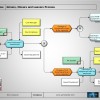
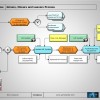
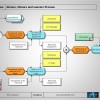
Function Step Overview
| 1.10 | When new employee joins a company, the line manager will assess their IT asset requirements. The line manager will update the employee’s HR record to show they have received the new equipment. Any new equipment required can be referred to the “Hardware Procurement Process” at this point. |
| 1.20 | The period of time between 1.10 and 1.20 could be years; equally, prior to this, an IT asset could have been lost or stolen or ceased to work. A break-out is offered above the 1.20 function step to accommodate either eventuality.
At 1.20 an employee is either changing jobs or cost center or department. So, there is a requirement to validate the IT equipment recorded against their name. If/when that employee leaves, this will be the state data a Line Manager will fall back on when it comes to retrieving IT equipment. A physical check of such IT assets may reveal that an IT asset is actually lost. It could also be that your business does not operate via cost center or departmental boundaries when it comes to managing IT; however, such a periodic check might be factored in to a Line Manager’s diary to annually review issued assets from a security point of view. |
| 1.30 | At 1.30 the new Line Manager will authenticate the information gleaned from function step 1.20 and update the HR system accordingly. Equally, if new equipment is purchased for the employee, this too can act as an instigator to update their HR record. |
| 1.40 | At 1.40, we see an employee is leaving the company, and so, has to return the equipment originally issued to them. The line manager will consult with the HR system to compare what should be returned versus what the employee brings back. Any discrepancies can be reported to HR via the Lost/Theft of Equipment Process. Recovery or write off action should be governed by the company policy pertaining to Loss/Theft of Equipment but should always be treated on a case by case basis. |
| 1.50 | Once the equipment is returned to the Line Manager, it may be advantageous for the Line Manager to retain that IT equipment for an impending new joiner. The Line Manager will need to relay this fact to HR at 1.70 |
| 1.60 | A more likely scenario is that the equipment will be returned to IT for data recovery/reimaging in time for the next user to draw down the equipment. |
| 1.70 | At 1.70, the HR department is required to update the departing employees HR record to annotate equipment no longer held by them. As mentioned, if any equipment is reported as lost/stolen, HR has a decision to make – deductions from a final salary, or to write off the cost of lost equipment. Criminal proceedings might also be considered. |
Increasingly, technology has a role to play in managing IT assets. For example, auto-wiping devices can make them unusable. Knowing where IT assets are is undoubtedly valuable information. Knowing who is accountable for them (in an ever-increasing mobile world) is just as important.
Other Process of the Month Articles:
- Software Re-harvesting Process
- Software Change Mangement Process
- Corporate Governance Process
- Maintain a Supported Software Catalogue
- Software Rationalisation Process
Upcoming Process of the Month Articles:
- Scope Verification Process
- Named User Verification Process
- Platform Identity Process
- Software Request Process
- Software Removal Process
- Process Review Process
The process kit by Rory Canavan is available from SAMcharter.com

Rory – thanks for a fascinating read. We find great variations in these processes and most organisations have poorly constructed or non-existent systems in place to manage the workflows you define. Take a look at http://www.connectpl.com for a ‘structured communications’ framework that aims to apply business process management disciplines to IT asset lifecyle management. It’s a topic we’ve termed Provisioning Lifecycle Management and your process is a great example.
Hi Colin, Many thanks for the feedback and positive vibe from your message. Communications is often a vital part of project management that is over-looked. I wrote two blogs on this subject in the past for Flexera entitled “Promoting your SAM Programme” (The links to which are on my linkedin profile).
If organizations only implemented one process this would be the one.
There are 2 scenarios I couldn’t fit in:
1) Where the starter brings their own device in addition to being issued one by company (e.g. tablet)
2) Where a contractor brings their device and personally licensed s/w (e.g. Graphic Designer with Adobe)
Outliers aside, very useful.
Another great and useful article from a real expert. Thanks Rory for sharing your knowledge and experience.
Thanks Andre, much appreciated.
Piaras, good popints indeed – if I was feeling lazy, I might bracket out BYOD/3rd party devices via an assumption; but increasingly in the real world such scenarios would need addressing.
Area of designing processes around Assets and Staff is complicated, but yes this gives a fair understanding of how it should be. Thanks Rory!
Great read, as usually.
One think I am not sure about is quite strong role of the Line Manager. I would prefer to keep more responsibility for equipment in IT Department and let Line Manager be responsible only for personal things (confirm new emplo arrival, leave, …).
I have bad experience with step 1.50 (Line Manager Retains Equipment).
Thanks Petr, I know what you mean about trusting to Line Managers. Some are extremely diligent, others view IT as not their concern.
To your observaton PetrS. – Bad experiences with Line Management involvement in IT – I look for a structure which enables and requires Line Management to take some responsbilty for correctly defining the IT needs of the people working for them; it’s the best way of driving down excessive software costs!
Rory thanks, great read
i have a question and may sound like a stupid one.
Q: in the process diagrams you have used 02 connectors which has a X and V in a circle box, what do they represent.
someone who may know answer, plz reply.
Hi Dev,
Thank you for the feedback. The ‘X’ means you can take one of many paths, the ‘V’ means you can take more than one path. An ‘A’ (without the cross bar) means you must take all paths offered from that junction (but I don’t recall using the A symbol in my diagrams so far).